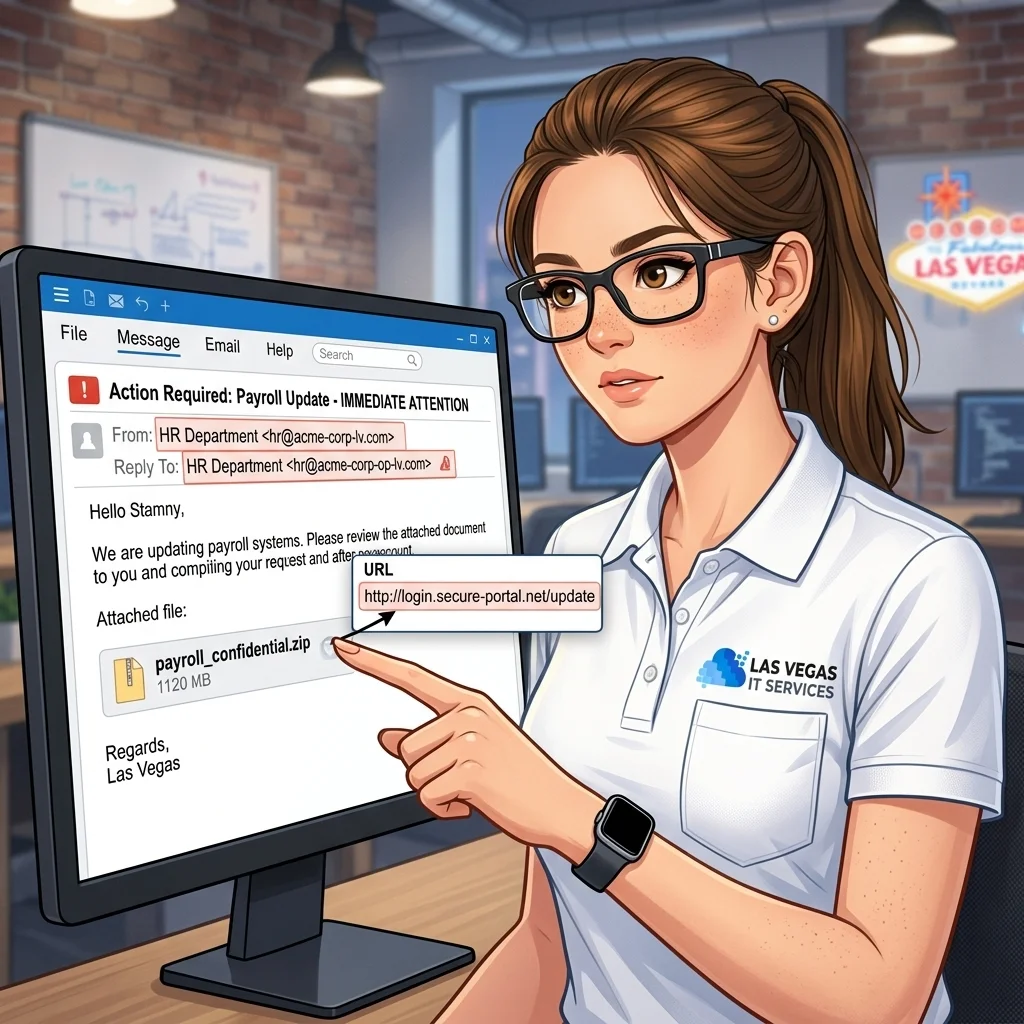
Phishing is not what it used to be. The obvious Nigerian-prince emails still land in your junk folder, but the messages that actually cost Las Vegas and Henderson businesses money in 2026 look nothing like that. They look like a vendor asking to update their bank details. A Microsoft 365 login page that matches yours pixel-for-pixel. A push notification you almost approved because you thought you were signing in yourself.
If you run a small business here, you are already being targeted. The FBI's Internet Crime Complaint Center reports that business email compromise remains one of the most financially damaging cybercrimes, with reported losses measured in billions of dollars a year. This guide walks through the red flags we train our own clients to recognize, why each one matters, and what your team should do before anyone clicks.
Key takeaways
- Modern phishing rarely has typos, sketchy links, or obvious sender mismatches. The cues are subtle.
- Vendor payment-change emails and executive impersonation drive the largest direct financial losses.
- MFA is not a force field. Attackers now steal session tokens and wear out users with push prompts.
- A written internal response checklist matters more than any single piece of security software.
- Phishing-resistant MFA, conditional access, and annual staff training cut your exposure dramatically.
1. Look-alike sender domains and display name tricks
The easiest cue is still the sender, but attackers have gotten much better at it. Watch for:
- A display name that matches a real person ("Maria Gonzalez, CFO") with an email address from a completely unrelated domain.
- Registered look-alike domains:
company-llc.cominstead ofcompanyllc.com, orrnicrosoft.comwith anrnthat reads asm. - Reply-To addresses that do not match the From address. Most phishing messages want your reply to land somewhere the attacker actually controls.
If you or your staff only see the sender's display name on a phone, you are missing most of the signal. Expand the full email header before you act.
2. Urgent payment or banking changes
This is the number-one money-loser for Las Vegas small businesses, and it usually targets finance, AP, or a bookkeeper. The pattern is almost always the same:
- An email appears to come from a known vendor, contractor, or executive.
- It asks you to update wire instructions, ACH details, or a routing number "for this invoice only."
- There is a reason you cannot call to confirm — travel, a meeting, a closing.
Treat every payment-change request as hostile until verified by a phone call to a number you already have on file, not a number in the email. Accounting firms are hit by this constantly; our IT services for accountants walks through the controls every financial operation should have before a single ACH goes out.
3. Fake Microsoft 365, Google, and DocuSign login pages
Credential harvesting is the plumbing underneath almost every modern attack. The page loads from a domain that is not login.microsoftonline.com or accounts.google.com, but the logos and layout are perfect. Staff type their password. The attacker logs in seconds later from a residential proxy in the same time zone so the sign-in looks normal.
Red flags here:
- Any link that takes you to a login page from an email, even one that looks expected.
- URLs with subdomains stacked to look legitimate:
login.microsoft.com.secureauth-365.co. - Shortened links (
bit.ly,t.ly) that hide the real destination.
Train your team to open Microsoft 365 from a bookmark or the desktop client, never from an email link. The US Cybersecurity and Infrastructure Security Agency maintains plain-language phishing guidance that is worth sending to every new hire in their first week.
4. Executive impersonation and gift-card scams
The CEO texts the office manager asking them to "step out and grab some gift cards for a client thank-you, send me the codes, I'll reimburse you." The phone number is not the CEO's real number. The email variant is the same pattern with a slightly wrong sender domain.
The defense is cultural more than technical. Make it a written policy that nobody in your organization will ever ask for gift card codes by text or email, and that requests outside normal channels require a voice confirmation. Put that policy in your employee handbook, not just in someone's head.
5. MFA fatigue and push bombing
If your team uses Microsoft Authenticator, Duo, or another push-based MFA, attackers who have already phished a password will send a flood of approval prompts at 2 a.m. until someone taps Approve just to make it stop. Sometimes they layer a fake IT call — "we're trying to push a security update, please approve the prompt" — on top.
Two defenses that actually work:
- Move to phishing-resistant MFA (passkeys, FIDO2 hardware keys, or number-matching push with a code the user has to type).
- Configure conditional access policies that require a managed device or a known location for admin accounts.
A Henderson business we support had 40+ push prompts fired at one account in a single night last quarter. Nobody approved. The only reason nobody approved is that we had already moved their leadership team to number-matching six months earlier.
6. Tone, timing, and "unusual but plausible" requests
The best phishing emails in 2026 are written by or with AI, which means they no longer read as clunky translations. What they still have is a feel:
- A mismatch between the apparent sender and the way they normally write.
- Pressure on a specific hour — "before the 3 p.m. close" — that short-circuits verification.
- A request that is just slightly outside normal: a new vendor, a new account, a one-time exception.
When something feels off, it is off. Train staff to forward suspicious messages to a shared mailbox for review rather than deleting them. Every reported message is a datapoint for your whole team.
What to do when a phishing message gets clicked
Assume you will eventually have an incident. A written response checklist turns a crisis into a procedure:
- Disconnect the affected device from the network and open a ticket.
- Reset the user's password and revoke all active sessions across Microsoft 365, Google Workspace, or whatever is affected.
- Rotate app passwords, OAuth tokens, and API keys the account had access to.
- Review the mailbox for forwarding rules, inbox rules, and new mobile device sign-ins an attacker may have added.
- Notify finance to hold any pending payments associated with the user.
- Document the incident — what arrived, what was clicked, what was changed, and when.
If you are a Henderson or Las Vegas business without a dedicated IT team, our Henderson IT services include incident response as part of every subscription, and we can have a response under way in minutes rather than hours.
FAQ
Do we still need security awareness training if we have good email filtering? Yes. Filtering blocks the bulk of commodity attacks, but targeted messages — particularly business email compromise — are often written one-at-a-time and sent in small volumes that never trigger the filter. People are the last line.
Is MFA enough to stop phishing? Password-plus-push MFA stops a lot of attacks but is bypassable through token theft and push fatigue. Phishing-resistant MFA — passkeys, hardware keys, or number-matching — is the bar to aim for in 2026.
What is the single biggest thing a small business can do this week? Write a payment-change verification policy. Any request to change banking details, wire instructions, or vendor account information must be verified by a phone call to a number on file. Put it in writing, circulate it, and enforce it.
Ready to tighten your email security?
If your team is still running on basic MFA, relying on the Microsoft 365 default filters, and doing phishing training once a year at renewal time, you are leaving real money on the table. We can audit your setup, roll out phishing-resistant MFA, tune your email security, and put a written incident playbook in your hands in a single engagement.
Get started with cyber security for your Las Vegas business — flat-rate, clear monthly billing, Las Vegas and Henderson based.
